> For the complete documentation index, see [llms.txt](https://help.sesami.co/llms.txt). Markdown versions of documentation pages are available by appending `.md` to page URLs; this page is available as [Markdown](https://help.sesami.co/help-center-live-nl/aan-de-slag/quickstart/activate-the-new-sesami-app-and-admin-portal.md).
# Activeer de nieuwe Sesami-app en het Admin-portaal
{% hint style="warning" %}
**Belangrijk:** Dit artikel is alleen van toepassing op winkels die **Sesami vóór 8 mei 2026 hadden geïnstalleerd.** Als je Sesami op of na deze datum hebt geïnstalleerd, kun je deze instructies overslaan.
{% endhint %}
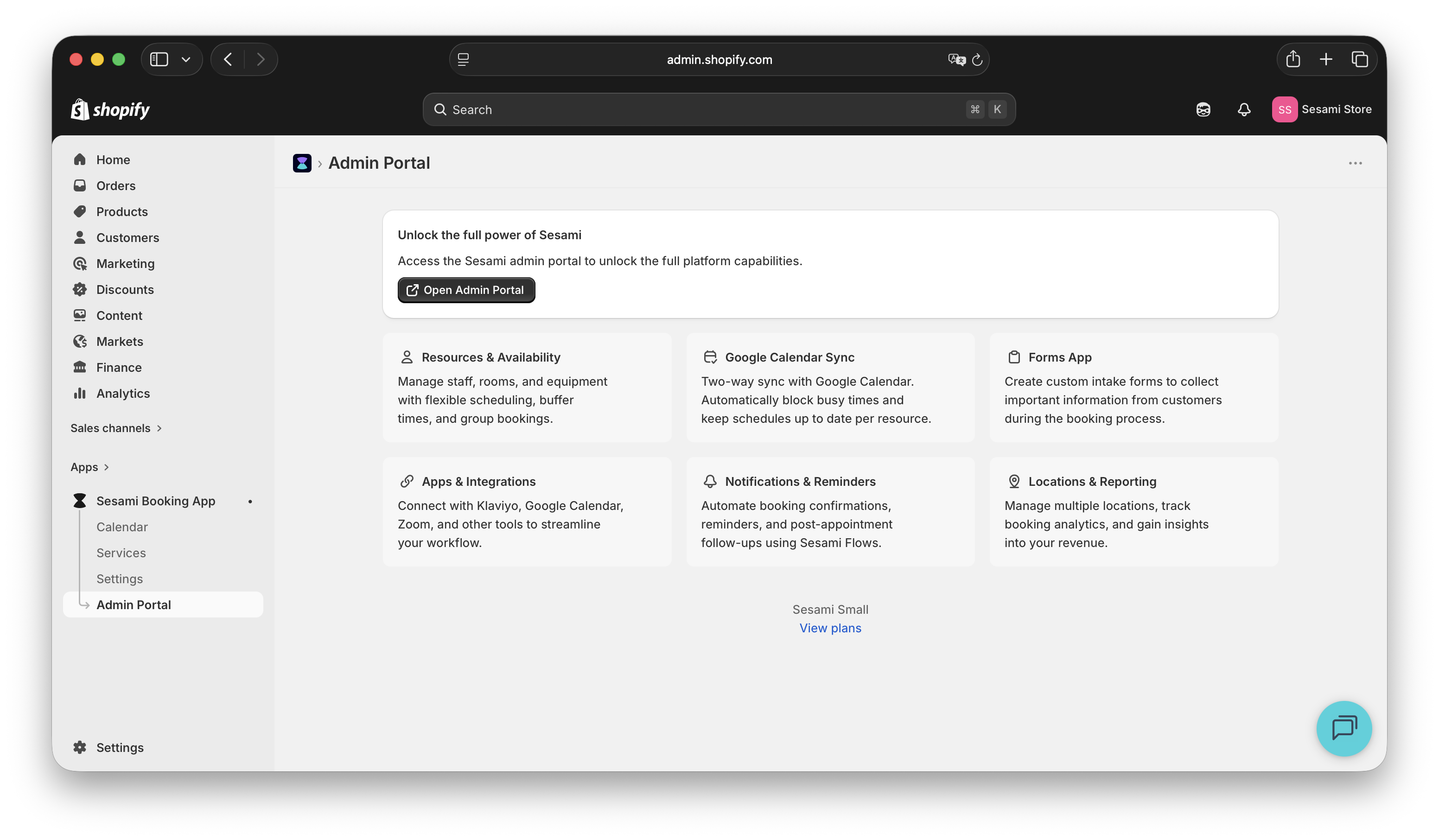
De nieuwe Sesami-ervaring biedt toegang tot het [Admin-portaal](/help-center-live-nl/beheer/sesami-admin-portal.md), waar je geavanceerde functies en instellingen kunt beheren om je bedrijf te helpen beheren.
Het Sesami Admin Portal biedt toegang tot geavanceerde Sesami-functies, waaronder:
* [Service](/help-center-live-nl/beheer/services.md) instellingen
* Meer maken [Bronnen](/help-center-live-nl/beheer/resources.md) en [Beschikbaarheid bewerken](/help-center-live-nl/boeking/availability/resource-availability.md)
* Aanmaken [Locaties](/help-center-live-nl/beheer/locations.md)
* Configureren [Meldingen](/help-center-live-nl/meldingen/notification-emails.md)
* [Apps & integraties](/help-center-live-nl/apps-integrations/shopify.md)
* en meer!
### Stap 1: Je winkel is al gemigreerd!
### Stap 2: Controleer je e-mail
1. De e-mail "Sesami Invitation" is automatisch verzonden naar je [geregistreerde e-mailadres van de winkel](https://admin.shopify.com/settings/general/store-contact-details).
2. Open de e-mail en klik op **Activeer je account**.
### Je bent helemaal klaar!
Zodra de activering is voltooid, heb je toegang tot de Admin Portal-ervaring en alle geavanceerde Sesami-functies.
Je kunt op elk moment rechtstreeks vanuit de Sesami-app terugkeren naar het Admin Portal.
## Probleemoplossing
Ik heb de uitnodigingsmail niet ontvangen
Controleer:
1. [E-mailadres van de Shopify-winkel](https://admin.shopify.com/settings/general/store-contact-details)
2. Spam-/ongewenste e-mailmap
3. tabblad Promoties
4. Neem contact op met het Sesami-team
Hoe vind ik mijn Shopify Store Email?
[Shopify-beheer → Instellingen → Winkelgegevens → Contactgegevens](https://admin.shopify.com/settings/general/store-contact-details)
Ik zie stap 1 niet (Sesami App Embed inschakelen)
Of deze stap wordt weergegeven, hangt af van je Shopify-thema en of de Sesami App Embed al is ingeschakeld.
Als de App Embed al is ingeschakeld, ga je gewoon verder met de volgende stap.
Verkopers met alle abonnementen kunnen de App Embed gebruiken en de verouderde ScriptTag-integratie verwijderen.
Verificatie met Admin Portal mislukt
De fout kan optreden wanneer het e-mailadres van je Shopify-winkel wordt gewijzigd nadat de gebruiker van het Sesami Admin Portal is aangemaakt. Het kan zijn dat Sesami nog steeds het vorige e-mailadres aan het Admin Portal-account gekoppeld heeft, waardoor verificatie kan mislukken.
**Als je het Small-abonnement hebt:**\
Neem contact met ons op via ; ons ontwikkelingsteam kan de oude gebruiker verwijderen en een nieuwe aanmaken met je bijgewerkte e-mailadres.
**Als je het Pro- of Premium-abonnement hebt:**
1. Meld je aan bij het Admin Portal \[] met je vorige e-mailadres.
2. Ga naar Gebruikers.
3. Nodig je nieuwe e-mailadres uit als nieuwe gebruiker.
---
# Agent Instructions
This documentation is published with GitBook. GitBook is the documentation platform designed so that both humans and AI agents can read, navigate, and reason over technical content effectively. Learn more at gitbook.com.
## Querying This Documentation
If you need additional information that is not directly available in this page, you can query the documentation by asking a question.
Perform an HTTP GET request on the following URL with the `ask` and `goal` query parameters:
```
GET https://help.sesami.co/help-center-live-nl/aan-de-slag/quickstart/activate-the-new-sesami-app-and-admin-portal.md?ask=&goal=
```
`ask` is the immediate question: it should be specific, self-contained, and written in natural language.
`goal` is what the user is ultimately trying to achieve, the reason they need the answer. Sharing it helps GitBook give you a better, more relevant answer. A goal is most helpful when it describes the outcome the user wants rather than restating the question. For example, with `ask=how do I create an API token`, a goal like `automate deployments from our CI pipeline` lets GitBook tailor the answer to that use case.
The response will contain a direct answer to the question and relevant excerpts and sources from the documentation.
Use this mechanism when the answer is not explicitly present in the current page, you need clarification or additional context, or you want to retrieve related documentation sections.


.png?alt=media&token=d568cdb0-a71a-4c96-a138-30fea1953080)
